





'%3e%3cpath%20fill-rule='evenodd'%20clip-rule='evenodd'%20d='M33%2033H1V1H33V33Z'%20fill='white'/%3e%3cpath%20fill-rule='evenodd'%20clip-rule='evenodd'%20d='M33%2033H1V17H33V33Z'%20fill='%23DC143C'/%3e%3c/g%3e%3crect%20x='0.5'%20y='0.5'%20width='33'%20height='33'%20rx='16.5'%20stroke='black'%20stroke-opacity='0.1'/%3e%3cdefs%3e%3cclipPath%20id='clip0_37449_250459'%3e%3crect%20x='1'%20y='1'%20width='32'%20height='32'%20rx='16'%20fill='white'/%3e%3c/clipPath%3e%3c/defs%3e%3c/svg%3e)


For those who value performance above all else, the professional laptop category narrows quickly to machines that actually move timelines and render frames without hesitation. The bold, efficient Apple MacBook Pro delivers a clear leap in CPU and GPU throughput for content creators and developers who need reliable speed on the road.
⚡ At a Glance
- • Performance: Up to 10-core CPU and up to 16-core GPU deliver sustained multi-threaded and graphics throughput
- • Best suited to: Video editors, 3D artists, and music producers who run heavy timelines and plugin stacks
- • Might frustrate: Large-scale VFX teams rendering feature-length scenes; the up-to-16-core GPU sets an upper bound on single-machine GPU parallelism and will lengthen frame-by-frame render times compared with dedicated GPU farm hardware
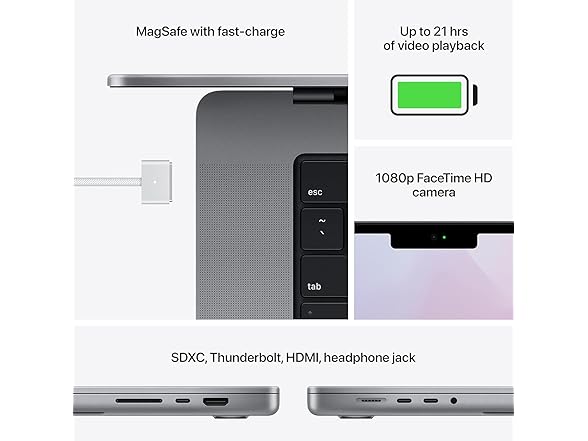
The 2021 MacBook Pro centers on the Apple M1 Pro chip, combining a high-core CPU with an up-to-16-core GPU and a Liquid Retina XDR display. A broad selection of built-in ports and enhanced audio and camera systems round out a workstation-focused package.
M1 Pro vs export bottlenecks
The M1 Pro pairs up to a 10-core CPU with an up-to-16-core GPU and machine learning enhancements that accelerate parallel workloads. Direct impact: longer timelines and batch exports finish noticeably faster, delivering smoother real-time playback during complex editing sessions.
Faster timeline scrubbing and quicker final exports keep creative sessions moving and reduce waiting between iterations. Professionals who push many simultaneous tracks and effects gain immediate throughput improvements with minimal background lag.
Liquid Retina XDR for the Modern User
Liquid Retina XDR preserves highlight and shadow detail across HDR-capable media, producing high contrast and a wide dynamic range. User scenario: while color-grading a short film, accurate highlights remain visible without blown-out glare, speeding client approval cycles.
A display that reveals subtle color and contrast differences speeds color-critical decisions and reduces the need for constant external reference monitors. Photographers and video editors will notice cleaner highlights and deeper blacks when assessing final frames.
✨ The Tested Highlights of the Apple MacBook Pro
- Apple M1 Pro chip – Delivers strong multi-core throughput for editing and compiling
- Liquid Retina XDR display – Maintains HDR detail for accurate color work
- Comprehensive port selection – Enables direct connections to pro peripherals and displays
- Sleek professional design – Feels stable on a desk and fits studio setups cleanly
📋 Technical Details at a Glance
- CPU: Up to 10-core
- Design: Sleek, professional design
- Display: Liquid Retina XDR display
- GPU: Up to 16-core
- Performance Features: Groundbreaking CPU, GPU, and machine learning performance
❓ Frequently Asked Questions
Q: What kind of ports are available for connecting external monitors and drives?
A: The description notes a comprehensive selection of ports for pro workflows, enabling direct connections to a range of monitors and storage options; Pro-Tip: verify the exact connector types on the retailer page so you can bring the correct cables or adapters for your existing docks.
Q: Is the M1 Pro suitable for machine learning tasks and accelerated workflows?
A: The technical notes highlight machine learning performance as part of the M1 Pro package, which accelerates models and ML-enabled operations in supported apps; Pro-Tip: choose software builds optimized for Apple silicon to take full advantage of the on-chip neural and GPU acceleration.
🏆 Our Verdict
The Apple MacBook Pro matches the needs of professionals who demand sustained CPU and GPU throughput for editing, rendering, and audio production. The Liquid Retina XDR display keeps highlight and shadow detail visible during color-critical work, which makes review sessions faster and more reliable. For buyers focused on long-term creative work, the combination of build quality and consistent performance delivers clear value over entry-level alternatives.
