





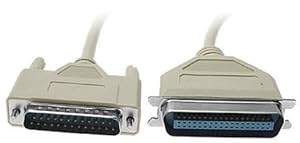
Parallel printer connection for legacy hardware promises a straightforward wired link between older PCs and Centronics printers. For small offices and home users keeping older kit running, fewer adapters mean fewer headaches. Is the Aptii Parallel Printer Cable the simple connector many users still need?
⚡ At a Glance
- • Connection Reliability: 25-line parallel wiring from DB25 male to 36-pin Centronics male for traditional parallel signalling
- • Best for: Owners of legacy printers and PCs that require a direct parallel connection
- • Not ideal for: Setups requiring IEEE1284 enhanced signalling or USB-only printers
A two-metre DB25 male to 36-pin Centronics male parallel cable with 25 data lines. Wiring supports bidirectional signalling but does not conform to IEEE1284.
Stable Data Transfer – With 25-line DB25 to Centronics wiring
Twenty-five dedicated parallel data conductors connect the DB25 male to the 36-pin Centronics male, matching traditional parallel printer signalling conventions. The wiring carries the standard control and data lines used by legacy printers.
Reliable transfer of print jobs between compatible PCs and printers reduces failed or partial prints. Consistent wiring avoids intermittent contacts common with loose adapter setups.
Quick Legacy Integration – Thanks to standard DB25 and Centronics connectors
A DB25 male plug mates with the parallel port on many older computers, while the 36-pin Centronics male plugs into the matching printer port without extra converters. Physical connector shapes and pin arrangements follow long-established parallel port norms.
Straightforward plug-and-play connection gets older kit working fast, ideal for retro computing, label printers or industrial printers that still use parallel ports. No special drivers are required beyond those already on the host system.
Basic Two-Way Signalling – With bidirectional wiring (non-IEEE1284)
Wiring supports bidirectional signal paths allowing basic status and control exchanges between host and printer. The cable does not implement the IEEE1284 enhanced parallel protocol, so extended features of that standard are unavailable.
Useful for printers that use simple status reporting and control lines, offering more functionality than a one-way lead. Avoids compatibility surprises where IEEE1284-specific features are expected.
✨ The 4 Key Reasons for Aptii Parallel Printer Cable
- 2-metre length – Provides ample reach for common desk and shelf printer arrangements
- Direct DB25 termination – Connects to PC parallel ports without additional adapters
- Clip-style Centronics plug – Secures to printer ports to reduce accidental disconnects
- Single-cable solution – Removes need for separate converter boxes or extra leads
📋 Technical Details at a Glance
- Category: Parallel Printer Cable
- Connectors: DB25 male to 36-pin Centronics male
- Data lines: 25
- Length: 2m
- Wiring: Bidirectional (non-IEEE1284)
❓ Frequently Asked Questions
Q: Does the cable support bidirectional communication?
A: Yes. Wiring is bidirectional for basic status and control exchanges, but the cable is not IEEE1284 compliant.
Q: What connectors are fitted to each end of the cable?
A: A DB25 male connector fits older computer parallel ports and a 36-pin Centronics male connector fits matching printer ports.
Q: Will this work with USB-only printers?
A: No. The cable connects to parallel DB25 and Centronics ports, so USB-only printers require a different interface or an active converter.
🏆 Our Verdict
Suitable for anyone maintaining legacy PCs and Centronics-equipped printers, particularly in offices, workshops or retro-computing setups. The cable’s straightforward DB25-to-Centronics design supplies a reliable, connector-specific link that keeps older printers usable. A cost-effective way to extend the life of legacy hardware and avoid unnecessary adapters.
