





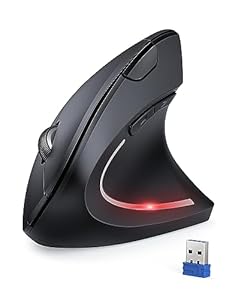
A personal computer accessory designed to reduce wrist strain while keeping pointer control precise. The TECKNET Ergonomic Mouse pairs a vertical shape with adjustable sensitivity for comfortable, accurate navigation during long sessions. Will it suit office work, creative tasks and quiet shared spaces?
⚡ At a Glance
- • Wearing Comfort: 57° tilt angle encourages a neutral handshake posture to reduce wrist and forearm fatigue
- • Best for: Office workers, designers and gamers who want reduced strain and improved pointer control
- • Not ideal for: Users who prefer a traditional horizontal mouse or Mac users needing full side-button support
Ergonomic vertical shape reduces pronation while six-buttons add navigation convenience. Quiet click and power-saving sleep mode suit shared or quiet environments.
Precise Pointer Control - With 4800 DPI and Five Adjustable Levels
Five sensitivity settings span 800–1600–2400–3200–4800 DPI, selectable on the fly to match tasks and screen setups. Higher DPI gives faster cursor travel while lower settings allow fine control for detailed work.
Easily switch sensitivity for office spreadsheets, multi-screen navigation or design work, so pointer movement feels deliberate rather than jumpy.
Long, Quiet Sessions - With Silent Click and Auto Sleep Power Management
Silent click technology reduces clicking noise by up to 95% while maintaining tactile response, and an automatic sleep mode activates after eight minutes of inactivity. A low-battery LED warns when batteries run low; two AAA cells power the unit.
Minimal click noise keeps shared workspaces and home offices calm, while auto sleep and battery indicator extend time between battery changes.
Fast Setup and Navigation - With 2.4GHz Plug & Play and Six Buttons
2.4GHz wireless connection via a USB receiver requires no driver and supports up to around ten metres of range. Six physical buttons include forward/back side controls for quick page navigation, though side buttons are not supported on macOS.
Quick plug-and-play connection gets systems working immediately, and the extra buttons speed browsing and routine tasks without software configuration.
✨ The 4 Key Reasons for TECKNET Ergonomic Mouse
- Five DPI Levels - Fine-tune cursor speed for precision work or rapid multi-screen movement
- Plug & Play Wireless - Stable 2.4GHz connection gives reliable freedom up to ten metres
- Six Buttons - Dedicated navigation controls speed browsing and everyday workflows
- Silent Click Technology - Minimises click noise for libraries and shared workspaces
📋 Technical Details at a Glance
- Category: Personal Computer / Ergonomic Vertical Mouse
- DPI: 800, 1600 (default), 2400, 3200, 4800
- Buttons: 6 (including side forward/back buttons)
- Tilt Angle: 57° ergonomic vertical tilt
- Connectivity: 2.4GHz wireless via USB receiver
❓ Frequently Asked Questions
Q: Does the mouse work with macOS?
A: Basic pointer and primary button functions work with macOS X 10.4 or later, but side buttons are not supported on macOS according to the manufacturer.
Q: What batteries does it use and how does power saving work?
A: Two AAA batteries are required (not included); an automatic sleep mode engages after eight minutes of inactivity and a low-battery LED alerts when power is low.
Q: How do I connect it to my computer and what range does it have?
A: Connection uses a 2.4GHz USB receiver with plug-and-play setup and no driver required, offering a reliable range of up to about ten metres (33 feet).
🏆 Our Verdict
The TECKNET Ergonomic Mouse suits office users, designers and casual gamers looking to reduce wrist strain while keeping precise control. Adjustable sensitivity, quiet clicks and plug-and-play wireless combine for comfortable, low-maintenance daily use. A budget-friendly, no-fuss choice that delivers solid long-term value for everyday computing.
