





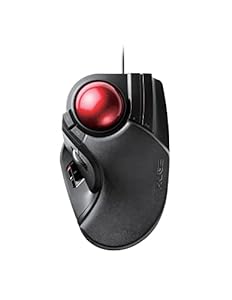
Wired trackball mouse for desktop use, designed to deliver precise cursor control with minimal hand movement. Comfortable palm rest and a large 52mm finger-operated ball make long editing or CAD sessions far less tiring. Is the ELECOM Trackball Mouse the ergonomic upgrade worth switching to?
⚡ At a Glance
- • Tracking Precision: Optical tracking with adjustable 500 / 1000 / 1500 DPI for fine cursor control
- • Best for: Desk-based professionals such as graphic designers, CAD users and editors
- • Not ideal for: Users who need wireless freedom or a compact travel mouse
Large 52mm ball and optical gaming-grade sensor enable accurate cursor movement. A wired connection, eight buttons and an attached palm rest focus on comfort and repeatable workflows.
Precise Cursor Control - With Optical Tracking and Switchable DPI
High-performance gaming-grade optics and lens work with a DPI button to toggle between 500, 1000 and 1500 counts, changing pointer speed on demand. The sensor translates small finger movements into accurate on-screen motion.
Selectable DPI makes pixel-level work easier, allowing fast pointer movement for large screens and slower, precise control for detailed editing.
Comfort for Long Sessions - Thanks to a 52mm Finger-Operated Ball and Palm Rest
A 52mm smooth red ball sits on three 2.5mm artificial ruby ball bearings to reduce friction and prevent dust build-up. An attached palm rest keeps the wrist supported so fingers do the pointing.
Reduced wrist movement lowers fatigue during prolonged use, making prolonged design or spreadsheet tasks more comfortable and sustainable.
Faster Workflows with Shortcuts - With Eight Buttons and Scroll Tilt
Eight physical buttons include two extra functions via scrollwheel tilting for horizontal scroll, and user reviews report dedicated configuration software for mapping functions. Buttons are positioned for quick thumb and finger access.
Custom button mapping speeds repetitive tasks such as copy/paste, tool switching or timeline scrubbing, cutting time on common workflows.
✨ The 4 Key Reasons for ELECOM Trackball Mouse
- Artificial Ruby Bearings - Ensures smooth rolling and reduces cleaning frequency during heavy use.
- Adjustable DPI - Switch between 500, 1000 and 1500 DPI for precise control across tasks.
- Eight Programmable Buttons - Map shortcuts to speed up repetitive editing tasks.
- Wired Connectivity - Stable wired connection avoids wireless lag during extended sessions.
📋 Technical Details at a Glance
- Category: Personal Computer
- Connectivity: Wired
- Ball Diameter: 52 mm
- Buttons: 8 physical buttons (incl. scroll tilt for horizontal scroll)
- DPI: Switchable 500 / 1000 / 1500
❓ Frequently Asked Questions
Q: Will it work with my Mac or PC?
A: Compatibility includes Windows 8, Windows 10, Windows 11 or later, and macOS 10.12 or later, so the trackball will work with those systems.
Q: How easy is the ball to clean?
A: The ball can be popped out through the hole in the bottom for cleaning, and the artificial ruby bearings are designed to prevent dust build-up so cleaning is required less often.
Q: Can I customise the buttons?
A: User reviews mention highly customisable buttons and user-friendly configuration software, allowing mapping of shortcuts and workflow adjustments.
🏆 Our Verdict
The ELECOM Trackball Mouse suits desk-based professionals who need precise pointer control and comfortable long-session use. Smooth artificial ruby bearings, a large 52mm finger ball and eight-button customisation make tasks such as CAD, design and editing noticeably more efficient. While the initial decision to switch requires commitment, robust construction and lower maintenance suggest strong long-term value.
