





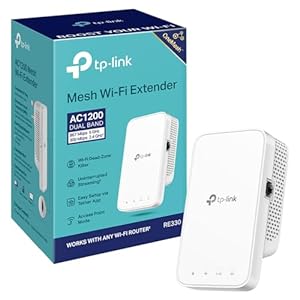
WiFi extender designed to remove weak-signal areas and extend reliable home broadband, the TP-Link RE330 WiFi Extender focuses on wider coverage and simple setup. Enjoy smoother streaming, fewer dropouts and steadier video calls across multiple rooms. Is this the straightforward fix most households need?
⚡ At a Glance
- • Coverage: Eliminates dead zones across the home using mesh-capable routing
- • Best for: Homes with patchy WiFi, multiple streaming devices and video calls
- • Not ideal for: Users who require a full-featured router with advanced configuration
Dual-band AC1200 delivers separate 2.4 GHz and 5 GHz links for mixed-device traffic. EasyMesh compatibility and a wired Ethernet option support seamless roaming and stable wired connections.
Wider home coverage – thanks to EasyMesh compatibility and smart routing
EasyMesh-compatible operation lets units join a single mesh network and the smart routing function chooses the fastest connection path between router and extender. The built-in signal indicator guides placement for the best link quality.
Consistent coverage across rooms reduces dead zones and roaming interruptions. Placing units where the signal indicator shows strong reception gives smoother streaming and fewer dropouts.
Smoother streaming and gaming – with dual-band AC1200 (2.4 GHz/5 GHz)
Dual-band operation separates slower devices on 2.4 GHz (up to 300 Mbps) from high-bandwidth activity on 5 GHz (up to 867 Mbps), reducing congestion. Band steering and simultaneous links keep latency lower for real-time traffic.
Multiple HD streams and online games can run at the same time with fewer buffering pauses. Users notice clearer video calls and steadier connections on phones, tablets and smart TVs.
Flexible wired and wireless options – with Ethernet port and AP mode
An Ethernet port supports a wired backhaul or direct connection for a single device, while AP mode turns a wired network point into a wireless access point. Setup is handled via WPS, the Tether app or a Web UI for browser-based control.
Wired devices gain lower latency and stable throughput, ideal for set-top boxes and desktop PCs. Easy switching between extender and AP roles lets the unit suit different home network layouts.
✨ The 4 Key Reasons for TP-Link RE330 WiFi Extender
- Dual-band AC1200 – Keeps multiple HD streams running without buffering at home
- EasyMesh-compatible – Joins mesh networks for seamless roaming between rooms
- Ethernet port & AP mode – Connects a wired device for stable, low-latency access
- Tether app and WPS – Set up and manage network quickly from phone in seconds
📋 Technical Details at a Glance
- Category: WiFi Extender
- Wireless Class: AC1200
- Bands: Dual-band (2.4 GHz and 5 GHz)
- Max Speed: 2.4 GHz — 300 Mbps; 5 GHz — 867 Mbps
- Ethernet Port: Yes (for wired connection / AP mode)
❓ Frequently Asked Questions
Q: Will this work with my existing router?
A: Works with any WiFi router or wireless access point, so integration is straightforward for most home networks.
Q: Can the unit join a mesh network for seamless roaming?
A: EasyMesh-compatible operation and smart routing allow units to form a mesh and select the fastest path between router and extender.
Q: How do I set it up and manage the connection?
A: Set up via WPS or the TP-Link Tether app, and use the Web UI for browser-based configuration; a signal indicator helps find the best location.
🏆 Our Verdict
Suitable for households that need a quick, practical improvement to patchy WiFi, especially where multiple streaming devices and video calls are common. The combination of dual-band AC1200, EasyMesh compatibility and a wired Ethernet option makes it a flexible choice for improving coverage. A cost-effective way to boost home connectivity, offering tangible long-term value through steadier daily performance.
