





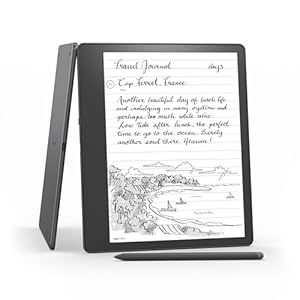
E-reader that doubles as a digital notebook, designed to combine comfortable reading with natural handwriting. Feel more organised and focused when capturing thoughts, annotating documents and summarising notes. Is the bold new approach to reading and writing the right fit for serious readers and professionals? Amazon Kindle Scribe
⚡ At a Glance
- • Reading Experience: Large 10.2-inch, 300 ppi Paperwhite display that is glare-free with adjustable warm light
- • Best for: Avid readers, students and professionals who take handwritten notes and annotate documents
- • Not ideal for: Users who need a colour display or extensive third-party apps
Paperlike 10.2-inch, 300 ppi display makes reading and handwriting clear and comfortable. Built-in notebook tools enable handwriting, annotation and AI-powered summarisation.
Write Like Paper - With a 10.2-inch 300 ppi Paperwhite display
The high-resolution Paperwhite panel delivers 300 pixels per inch on a glare-free surface and includes adjustable warm light plus auto-adjusting front light for different environments. Larger font sizes and a wide display area reduce scrolling and let handwriting sit beside text.
Natural-feeling handwriting and comfortable long-form reading day or night. Pages and notes remain easy to read while sketching, journalling or annotating.
Turn Notes into Shareable Text - Thanks to built-in notebook summarisation and export tools
On-device notebook functions include AI-powered summarisation and options to export notebooks to PDF or convert handwriting to typed text for sharing. Notebooks can be viewed on the Kindle app and sent to contacts after conversion.
Save time turning handwritten notes into digitisable, shareable documents. Ideal for meeting notes, study revision and sending highlights to colleagues.
Annotate Documents Seamlessly - With pen input and PDF/Word support
Pen input works across books, notebooks and supported documents, allowing annotation of PDFs and sticky-note creation in compatible Word files. Active Canvas creates space on-page for handwriting and lets margins expand or collapse around text.
Quickly mark up readings and draft edits without paper. Practical for reviewing reports, marking up PDFs and keeping handwritten thoughts linked to the original text.
✨ The 4 Key Reasons for Amazon Kindle Scribe
- Long battery life - Months of reading or weeks of writing on a single USB-C charge
- Adjustable warm light - Personalise screen tone for comfortable day and night reading
- Export and share tools - Convert notes to text, export PDFs and send to contacts easily
- Active Canvas margin expansion - Expand margins to add handwritten notes while reading
📋 Technical Details at a Glance
- Display: 10.2-inch Paperwhite, 300 ppi, glare-free, adjustable warm light
- Storage: 16 GB
- Stylus: Pen included
- Battery: Months of reading or weeks of writing on a single USB-C charge
- Notebook tools: Built-in AI notebook summarisation, convert to text, export to PDF
❓ Frequently Asked Questions
Q: Can I write directly in books and expand the page for notes?
A: Yes. Start writing on the page and Active Canvas creates space for notes; margins can be expanded to add more handwriting or collapsed to view the original page.
Q: Does the pen need charging?
A: The product information states the pen never needs charging, so handwriting is available without pen battery maintenance.
Q: Can I export handwritten notes or share them?
A: Yes. Notebooks can be exported to PDF or converted to text and sent to contacts, and notebooks are viewable on the Kindle app.
🏆 Our Verdict
The Amazon Kindle Scribe suits readers who also need a capable handwriting surface for notes, sketches and document annotation. The combination of a large 10.2-inch Paperwhite display, on-device notebook tools and straightforward export options is the main selling point. While the cost may be above entry-level readers, those who value long battery life and integrated handwriting workflows will find strong long-term value.
