





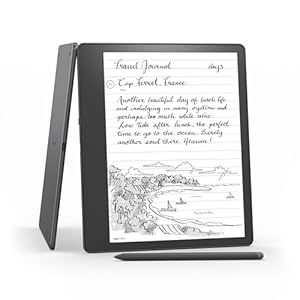
Amazon Kindle Scribe blends an e-reader and digital notebook into one device with a large Paperwhite display for natural reading and handwriting. Enjoy the calm of paper-like note-taking while keeping meeting notes and sketches organised. Is built-in notebook summarisation enough to replace paper and separate note apps?
⚡ At a Glance
- • Writing Experience: Paper-like handwriting on a 10.2-inch, 300 ppi Paperwhite display with Active Canvas margin expansion
- • Best for: Readers, students and professionals who take notes, sketch and annotate documents
- • Not ideal for: People who want a full-colour tablet experience or frequent multimedia use
Large high-resolution Paperwhite display combines reading and handwriting in one place. Built-in notebook tools and document annotation bring active note-taking to a reading-focused device.
Write Like Paper – With a 10.2-inch 300 ppi Paperwhite display
A 10.2-inch Paperwhite panel renders text and strokes at 300 ppi for crisp detail, while Active Canvas expands margins automatically when handwriting begins to create extra space for notes. The Basic Pen supplies a pressure-sensitive, battery-free input for natural-feeling strokes.
Natural, comfortable handwriting and clear text make long study or reading sessions less tiring. Margin expansion keeps notes linked to the page without obscuring the original content.
Organise and Share Notes Quickly – Thanks to built-in notebook summarisation and export tools
On-device notebook summarisation condenses written content into concise summaries, while export options let users save notebooks as PDFs or convert handwriting to text for sharing. Notebooks can be viewed on the companion Kindle app for cross-device access.
Speeds up review of meeting notes, research highlights or study material and makes it simple to distribute concise summaries to colleagues or classmates.
Annotate Documents Confidently – With PDF and Word mark-up support
Annotation tools support reviewing and marking up PDF files and creating sticky notes in Microsoft Word and other compatible documents for feedback workflows. Mark-ups remain attached to the document for later review or export.
Streamlines proofreading, document review and academic annotation without reverting to printed pages and pens. Clear, shareable annotations keep collaboration organised.
✨ The 4 Key Reasons for Amazon Kindle Scribe
Active Canvas – Expand margins and anchor handwritten notes to pages
Built-in AI summarisation – Condense notebooks into short summaries for quick review
Basic Pen (no charging) – Handwrite freely, the pen never needs a recharge
Export to PDF or text – Share notes and drafts from device with colleagues
📋 Technical Details at a Glance
- Category: Digital notebook and e-reader
- Display: 10.2-inch Paperwhite, 300 ppi, glare-free
- Storage: 16 GB
- Pen: Basic Pen included, no charging required
- Notebook features: Create notebooks, Active Canvas margin expansion
❓ Frequently Asked Questions
Q: Does the pen need charging?
A: The Basic Pen never needs charging, so handwriting works without managing pen batteries.
Q: Can I export or share my handwritten notes?
A: Notebooks can be exported to PDF, converted to text and sent to contacts, and notebooks are viewable on the companion Kindle app.
Q: Can I annotate PDFs and Word documents?
A: Yes, PDF files can be reviewed and marked up, and sticky notes can be created in Microsoft Word and other compatible documents.
🏆 Our Verdict
Suitable for avid readers, students and professionals who want a single device for reading and detailed note-taking. The combination of a large 10.2-inch Paperwhite display, natural handwriting with a Basic Pen and built-in notebook summarisation makes reading and organising notes seamless. While aimed at regular note-takers rather than casual readers, long battery life and exportable notebooks deliver solid long-term value.
