





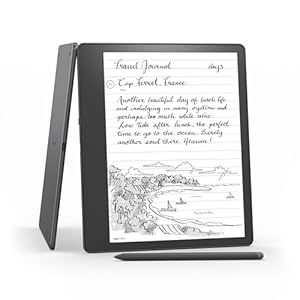
A large-screen e-reader and digital notebook built for reading and handwriting on one device. Amazon Kindle Scribe pairs a high-resolution Paperwhite display with a pen for natural note-taking and organised notebooks. Is it the right tool for readers who want serious, portable handwriting and export options?
⚡ At a Glance
- • Writing Experience: Paper-like handwriting capture on a 10.2-inch, 300 ppi glare-free Paperwhite display
- • Best for: Readers who want to annotate books and keep organised digital notebooks
- • Not ideal for: Users who need a full tablet app ecosystem rather than a reading-first device
A single device combining a 10.2-inch Paperwhite display with a Basic Pen and Active Canvas. Built-in AI notebook summarisation and long battery life support extended reading and writing sessions.
Natural handwriting and margin notes – with a 10.2-inch, 300 ppi Paperwhite display and Basic Pen
The 10.2-inch Paperwhite screen delivers 300 ppi for crisp text and accurate pen input, while Active Canvas expands or collapses page margins to create writing space. The Basic Pen captures handwriting without requiring its own charge.
Handwriting feels close to paper and stays legible at small sizes, making long annotations and sketches easy. Margin expansion keeps notes alongside text without switching apps.
Organised notebooks and quick exports – thanks to built-in AI notebook summarisation and export tools
Built-in AI notebook tools can summarise and refine handwritten notes, and notebooks can be viewed on the Kindle app, exported to PDF, or converted to text for sharing. Exports can be sent to contacts directly from the device or app.
Notes are easier to review and share after meetings or study sessions, reducing manual transcription. Exports in PDF or text formats simplify sending notes to colleagues or saving them externally.
Long reading and writing between charges – thanks to extensive battery life and USB-C charging
A single USB-C charge provides months of battery life for reading and weeks for writing according to the product description. Power management is tuned for extended Paperwhite use rather than frequent recharging.
Less time worrying about battery and more time reading or taking notes on the move. Ideal for travel and long study sessions where access to chargers is limited.
✨ The 4 Key Reasons for Amazon Kindle Scribe
- Active Canvas - Create expandable margin space for notes without leaving the page
- Built-in AI notebook summarisation - Turn long notes into concise summaries to share quickly
- PDF and document annotation - Mark up files and add sticky notes for quick reference
- Basic Pen never needs charging - Ready to write whenever, no pen charging or downtime
📋 Technical Details at a Glance
- Display: 10.2-inch Paperwhite, 300 ppi, glare-free, adjustable warm light, auto-adjusting front light
- Storage: 64 GB
- Pen: Basic Pen, no charging required
- Notebook tools: Built-in AI notebook summarisation and refinement
- Writing features: Active Canvas with expandable/collapsible margins
❓ Frequently Asked Questions
Q: Can handwritten notes be exported from the device?
A: Yes. Notebooks can be exported to PDF or converted to text and sent to contacts, and notebooks are viewable in the Kindle app.
Q: Does the pen need charging?
A: No. The Basic Pen never needs charging according to the product information.
Q: Can PDFs and other documents be annotated?
A: Yes. PDFs can be reviewed and marked up, and sticky notes can be added in Microsoft Word and other compatible documents.
🏆 Our Verdict
The Kindle Scribe is ideal for avid readers who also need robust handwriting and notebook features for study, work or journaling. Built-in AI summarisation, Active Canvas margin notes and a large 10.2-inch Paperwhite display make reading and organising handwritten notes straightforward. While positioned above basic e-readers in capability, long battery life and export tools deliver lasting value for regular note-takers.
