





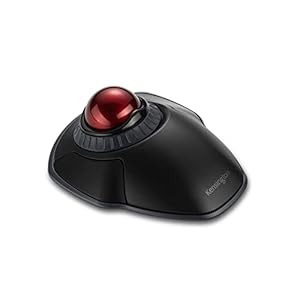
A personal computer peripheral that delivers precise pointer control while saving desk space. The Kensington Orbit Wireless Trackball Mouse combines ambidextrous ergonomics, a scroll ring and dual wireless connectivity for secure, travel-friendly use. Can such a compact solution handle everyday office and creative tasks reliably?
⚡ At a Glance
- • Tracking Accuracy: Smooth, fast, accurate tracking with precise cursor control
- • Best for: Users with limited desk space, frequent travellers and ambidextrous needs
- • Not ideal for: People who prefer a conventional free-moving mouse for rapid swipes
Ambidextrous wireless trackball with a scroll ring and detachable wrist rest. Dual wireless options include 2.4GHz and Bluetooth 3.0/LE with 128-bit AES government-grade encryption.
Precise cursor control - with optical tracking and four DPI settings
Optical tracking technology reads movement from the trackball and translates it into smooth cursor motion, while four selectable DPI settings adjust pointer sensitivity. Customisable buttons allow fine-tuning of common actions for different tasks.
High-precision control suits detailed work such as spreadsheet navigation and image editing. Adjustable sensitivity helps balance speed and accuracy across different screens and workflows.
Flexible pairing and secure connections - thanks to dual wireless modes and AES encryption
Dual wireless connectivity supports a 2.4GHz USB receiver and Bluetooth 3.0 with LE, allowing choice between a dedicated dongle and standard Bluetooth pairing. Connections are protected with 128-bit AES government-grade encryption.
Switch easily between laptop and desktop without reconfiguring hardware, while encrypted links keep cursor input private on public or shared networks. Reliable pairing suits mobile working and office setups.
Comfort for long sessions and travel - with ambidextrous design and detachable wrist rest
An ambidextrous shell accommodates left- or right-handed use, and a detachable wrist rest offers optional support during extended use. Compact dimensions and plug-and-play installation make the unit straightforward to carry and set up.
Comfortable for users who alternate hands or often work away from the desk. The detachable rest adds wrist support when needed while remaining easy to stow for travel.
✨ The 4 Key Reasons for Kensington Orbit Wireless Trackball Mouse
- Scroll ring - Smooth vertical navigation speeds through long documents efficiently
- Dual wireless modes - Switch between Bluetooth and 2.4GHz dongle for flexible pairing
- Customisable buttons - Assign shortcuts to reduce repetitive clicks and speed workflows
- Detachable wrist rest - Add wrist support for longer sessions and comfortable use
📋 Technical Details at a Glance
- Category: Personal computer peripheral
- Connectivity: 2.4GHz wireless (USB receiver) and Bluetooth 3.0/LE
- Security: 128-bit AES government-grade encryption
- Tracking: Optical tracking technology
- DPI settings: Four selectable DPI settings
❓ Frequently Asked Questions
Q: Is the trackball compatible with Mac and PC?
A: Yes, plug-and-play installation allows use with Mac and PC systems as stated in the product description.
Q: Can left-handed users use the trackball?
A: Yes, the ambidextrous design supports left- or right-handed users.
Q: How secure is the wireless connection?
A: The wireless connection uses 128-bit AES government-grade encryption, suitable for secure cursor input over wireless links.
🏆 Our Verdict
The Kensington Orbit Wireless Trackball Mouse suits users who need precise pointer control in tight spaces, frequent travellers and those who switch hands. Ambidextrous comfort, a scroll ring and dual wireless modes with AES encryption make it a practical, secure choice. While positioned as a specialist peripheral rather than a basic spare, robust features and travel-friendly design should deliver long-term value.
