






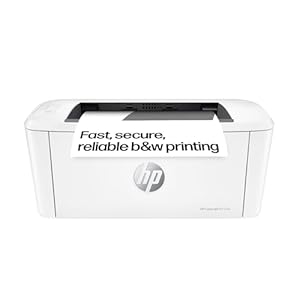
HP LaserJet M110w Printer is a compact monochrome laser designed for small workspaces with straightforward mobile printing. Small teams benefit from tidy desks, quick document runs and easy phone-to-print workflows. Does it deliver the speed and reliability required for a busy home or small office?
⚡ At a Glance
- • Print Quality: Sharp monochrome text and consistent toner density for clear documents
- • Best for: Small home offices and single-user workstations needing compact mono printing
- • Not ideal for: Users who require colour printing or high-volume colour workflows
Compact laser design with a 150-sheet input tray and up to 20 pages per minute. Wireless mobile printing and Auto-on/Auto-off Technology support efficient day-to-day use.
Quick, reliable printing - with an up to 20 ppm laser engine
A monochrome laser engine is tuned for document throughput, producing pages at up to 20 pages per minute for typical A4 jobs. The LED control and simple interface support continuous small-batch printing.
Faster turnaround for everyday office documents reduces queues and keeps small teams productive.
Compact footprint for tight workspaces - with the smallest laser-in-class design
Chassis engineered to occupy minimal desk space while still accommodating a 150-sheet input tray and straightforward LED-button control. The compact layout places essential controls within easy reach.
Fits on crowded desks or compact shelving, making it suitable where space is at a premium.
Mobile workflows and cloud scanning - with HP Smart app and wireless self-reset
HP Smart app enables printing from phones and tablets, photo-to-copy functionality, and direct sharing of scans to Dropbox or Google Drive. Wireless self-reset helps re-establish network connections after interruptions.
Makes printing and scanning from mobile devices simple and keeps workflows moving with minimal manual reconnects.
✨ The 4 Key Reasons for HP LaserJet M110w Printer
- Fast print speed – Up to 20 pages per minute for quick document batches
- 150-sheet input tray – Holds 150 pages, reducing refill frequency for busy small offices
- HP Smart app – Print and scan from phone, share scans directly to cloud services
- Auto-on/Auto-off Technology – Saves power by switching on and off according to use patterns
📋 Technical Details at a Glance
- Type: Black & white laser printer
- Model: HP LaserJet M110w
- Print speed: Up to 20 pages per minute (A4)
- Input tray: 150-sheet input tray
- Connectivity: Wireless with self-reset for improved reconnection
❓ Frequently Asked Questions
Q: Can I print from my phone or tablet?
A: Yes. Use the HP Smart app to print from phones or tablets and to send scanned images directly to cloud services such as Dropbox and Google Drive.
Q: Does this unit print in colour?
A: No. The printer is a black and white laser model designed for monochrome document output.
Q: How many sheets does the input tray hold?
A: The input tray holds 150 sheets, which reduces the need for frequent refills during everyday office use.
🏆 Our Verdict
The HP LaserJet M110w Printer suits small home offices and single-user workstations that need compact, dependable monochrome printing. The combination of up to 20 ppm laser output, a 150-sheet tray, mobile printing via HP Smart and energy-saving Auto-on/Auto-off Technology is its main selling point. While purchase decisions vary, the focus on efficiency and simple mobile workflows makes it a practical long-term choice for light to moderate office printing needs.
