





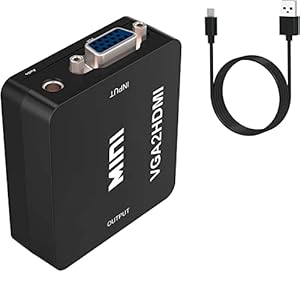
A handy electronics adapter that turns older VGA-equipped computers into HDMI-ready sources for monitors, projectors and HDTVs, preserving both video and stereo audio. For classroom, office and streaming setups that must use ageing kit, the Multibao VGA to HDMI Converter simplifies connections and reduces rewiring. Is this the easiest way to keep older machines working with modern displays?
⚡ At a Glance
- • Image Quality: Supports HDTV output up to 1080p with converted VGA video and stereo audio passed through
- • Best for: Users connecting VGA-only PCs or laptops to HDMI monitors, projectors or capture cards
- • Not ideal for: Setups that require bi-directional conversion or resolutions higher than 1080p
Converts analogue VGA plus stereo audio into an HDMI digital signal. Requires an external USB power source and includes a 3.5mm audio cable for sound.
Bigger-screen viewing - Thanks to VGA to HDMI conversion
Analogue VGA video and a separate stereo audio input are sampled and encoded into an HDMI output, with a USB port supplying necessary external power. Female VGA and HDMI ports accept male-to-male cables commonly used with monitors and projectors.
Older PCs and laptops gain the ability to drive modern HDMI displays and projectors at up to 1080p, making presentations and media playback straightforward.
Keep sound with the video - With included 3.5mm stereo audio cable
VGA carries video only, so a dedicated 3.5mm audio input captures the computer's sound and merges it into the HDMI output. A supplied audio cable plugs directly into line-out or headphone sockets.
Audio arrives at the HDMI-equipped display or capture device without needing extra adapters, so speakers or recording setups receive both picture and sound.
Quick setup for capture and meetings - With USB-powered operation
USB power stabilises the video conversion circuitry during use and is supplied via the included USB cable into a USB port or power adapter. The converter is not bi-directional, so connections must run from VGA input to HDMI output only.
Rapid installation suits meeting rooms, classrooms and streaming rigs, provided a USB power source is available for continuous operation.
✨ The 4 Key Reasons for Multibao VGA to HDMI Converter
- Included 3.5mm audio cable - Ensures audio reaches HDMI displays without extra adapters
- USB power cable - Keeps conversion stable for long sessions and capture setups
- Female VGA and HDMI ports - Works with existing male-to-male cables commonly found in monitors
- Simple plug-and-play installation - Set up quickly for meetings, teaching, or streaming capture
📋 Technical Details at a Glance
- Input: VGA (female)
- Audio Input: 3.5mm stereo (female)
- Output: HDMI (female)
- Supported Resolution: Up to 1080p HDTV
- Power: USB external power required (USB cable included)
❓ Frequently Asked Questions
Q: Does the converter carry audio as well as video?
A: Yes. A 3.5mm stereo audio input is provided and a cable is included so audio can be merged into the HDMI output.
Q: Is the converter bi-directional?
A: No. Conversion works from VGA input to HDMI output only and does not support HDMI to VGA conversion.
Q: Does the adapter need external power?
A: Yes. External power is required via the supplied USB power cable to ensure stable conversion during use.
🏆 Our Verdict
The Multabao VGA to HDMI Converter suits anyone who needs to connect VGA-only computers to modern HDMI displays or capture gear. Combining VGA video conversion, a stereo audio input and included cables makes it a practical way to reuse older hardware. As a straightforward, cable-included solution, it delivers good long-term value for classrooms, offices and streaming setups when higher resolutions are not required.
