





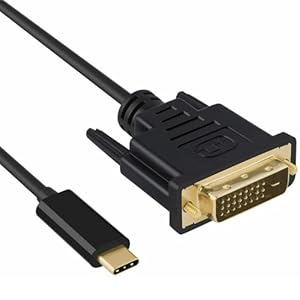
Connecting modern USB-C laptops and phones to older DVI screens can be awkward when adaptors flicker or fail. The baolongking USB-C to DVI Cable creates a stable, plug-and-play video link from DP Alt Mode USB-C ports to DVI displays, keeping meetings and presentations smooth. Will it cover common compatibility quirks and higher-resolution monitors?
⚡ At a Glance
- • Video Support: Supports up to 2560x1440@60Hz on Windows and 1920x1080@60Hz on macOS; backward compatible with 1080p
- • Best for: Users who need a straightforward USB-C to DVI connection for monitors and projectors
- • Not ideal for: Setups needing dual-link DVI or compatibility with Apple Cinema Displays
Requires a full-pin USB-C port with DisplayPort Alt Mode for video output. Backward compatible with 1080p but not compatible with displays that require dual-link DVI.
Stable, flicker-free connections - thanks to USB 3.1 DP Alt Mode support
DisplayPort Alt Mode carries native DisplayPort signals over USB-C, so video is transmitted without extra converters when the host port is full-pin. No drivers are required for supported operating systems, enabling a direct signal path to single-link DVI.
Immediate recognition by many monitors and projectors produces a reliable, flicker-free picture for presentations and multi-screen desks.
Higher-resolution output on compatible hosts - with single-link DVI support up to 2560x1440@60Hz on Windows
The cable converts DP Alt Mode output to single-link DVI signalling, which supports 2560x1440 at 60Hz on Windows and 1920x1080 at 60Hz on macOS according to the product information. Single-link DVI bandwidth limits prevent higher-refresh or dual-link resolutions.
Suitable for multitasking on many high-resolution DVI monitors when paired with a compatible Windows host, while remaining compatible with standard 1080p displays.
Durable, travel-ready build - with robust connectors and a two-year warranty
User feedback highlights sturdy connectors and durable cable construction, and the manufacturer offers a 30-day refund plus 24 months warranty. Construction quality combined with warranty coverage reduces early-failure risk.
Durable construction and manufacturer support make the cable a sensible choice for daily docking, office use and frequent travel.
✨ The 4 Key Reasons for baolongking USB-C to DVI Cable
- Plug-and-play compatibility - Recognised instantly by most systems, no driver installation required.
- Windows high-res support - Handles up to 2560x1440 at 60Hz on compatible Windows hosts.
- Robust connectors - Reinforced ends and durable cable for frequent plugging and travel.
- Warranty & returns - 30-day refund and 24-month warranty for extra peace of mind.
📋 Technical Details at a Glance
- Category: Video adapter cable
- Connector A: USB-C (requires full-pin, DP Alt Mode)
- Connector B: DVI Female (single-link DVI)
- Supported resolutions: Up to 2560x1440@60Hz (Windows), 1920x1080@60Hz (macOS), backward compatible with 1080p
- Host requirements: USB-C port with DisplayPort Alt Mode and full-pin wiring
❓ Frequently Asked Questions
Q: What maximum resolution does the cable support?
A: According to the product information, the cable supports up to 2560x1440 at 60Hz on Windows and 1920x1080 at 60Hz on macOS, and is backward compatible with 1080p.
Q: Do I need a special USB-C port on my laptop?
A: Yes, the host USB-C port must support DisplayPort Alt Mode and be full-pin wired; without those, video output will not work.
Q: Is it compatible with Apple Cinema Displays or monitors that need dual-link DVI?
A: No, the documentation states the cable is not compatible with Apple Cinema Displays or monitors that require a dual-link DVI connection.
🏆 Our Verdict
Ideal for users who need a straightforward, reliable USB-C to DVI link for older monitors and projectors. Stable plug-and-play operation, support for up to 2560x1440@60Hz on compatible Windows hosts, and a sturdy build with a 24-month warranty are the main strengths. That combination delivers good long-term value for mixed laptop-to-DVI setups.
