





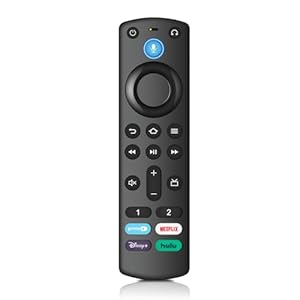
The SZILBZ Voice Remote Control is a streaming accessory built to replace lost or ageing remotes, with voice search and programmable shortcuts for quicker navigation. Viewers who want effortless searching and easy headphone pairing will appreciate the simplicity. Is it the right fit for owners of Fire TV sticks and compatible Insignia, Toshiba and Pioneer smart TVs?
⚡ At a Glance
- • Compatibility: Works with Fire TV Cube (1st/2nd/3rd gen), TV Stick 4K Max, TV Stick 4K, TV Stick (2nd/3rd gen), TV Stick Lite and compatible Insignia, Toshiba and Pioneer Fire smart TVs
- • Best for: Users who need a straightforward voice remote replacement for supported streaming hardware
- • Not ideal for: People who expect included batteries or manufacturer-specific warranty and features not listed
A 3rd gen pro plus remote with voice search and four preset shortcut keys. Two programmable buttons and a dedicated headphone button enable customisation and quick Bluetooth pairing.
Find programmes faster, with voice search and shortcut buttons
A pre-programmed voice search function works alongside four dedicated shortcut buttons that map to popular services. Voice queries and single-press shortcuts reduce the need to navigate menus manually.
Quicker access to shows and apps saves time and effort when searching, especially useful for households that share streaming profiles and remote control duties.
Custom access to favourites, with two programmable buttons
Two custom buttons can be programmed by pressing and holding [1] or [2] to assign a chosen service or app. The programming stores that assignment for immediate recall.
Instantly reach frequently used apps with one long-press customisation, making navigation more personal and faster for daily viewing routines.
Private listening made simple, with a dedicated Bluetooth headset button
A newly added headphone button helps initiate Bluetooth pairing, and the remote enters pairing mode by holding HOME for 10 seconds until the LED flashes. Pairing is completed via Settings > Controls & Bluetooth devices > AMZ TV remote controls > Add new remote control.
Quick headphone pairing supports late-night watching and private listening without repeatedly navigating TV menus.
✨ The 4 Key Reasons for SZILBZ Voice Remote Control
- Voice Search - Locate apps and titles without typing, saving time on searches
- Shortcut Buttons - Instant access to four services with a single button press
- Programmable Buttons - Two customisable shortcuts for immediate access to favourites
- Bluetooth Headset Button - Quick headphone pairing without navigating multiple menus
📋 Technical Details at a Glance
- Category: Electronics
- Brand: SZILBZ
- Model: 3rd Gen Pro Plus Voice Remote
- Compatibility: Fire TV Cube (1st/2nd/3rd gen), TV Stick 4K Max (1st/2nd gen), TV Stick 4K, TV Stick (2nd/3rd gen), TV Stick Lite, Fire Smart TV (3rd gen) and compatible Insignia/Toshiba/Pioneer smart TVs
- Voice Control: Voice search function for content and app lookup
❓ Frequently Asked Questions
Q: Is the remote compatible with Fire TV Stick 4K Max?
A: Yes, compatibility includes the TV Stick 4K Max (1st and 2nd generation) as listed in the manufacturer description.
Q: Are batteries included in the package?
A: No, the package notes that 2 AAA batteries are not included.
Q: How do I pair the remote with my TV or stick?
A: Go to Settings > Controls & Bluetooth devices > AMZ TV remote controls > Add new remote control, then press and hold the HOME button for 10 seconds until the remote LED flashes to enter pairing mode.
🏆 Our Verdict
Ideal for owners of supported Fire TV sticks, Cubes and compatible Insignia/Toshiba/Pioneer smart TVs who need a reliable voice remote replacement. The combination of voice search, four preset shortcuts and two programmable buttons speeds up navigation and personalises access to favourite services. A straightforward pairing process and dedicated headphone button add long-term practical value for everyday streaming.
