





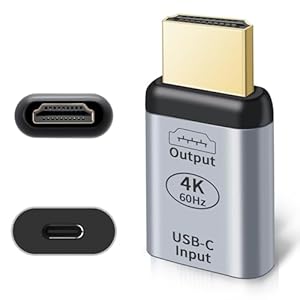
A compact electronics accessory that promises clean 4K@60Hz video from USB-C sources with minimal fuss. Enjoy sharper video and simpler set-ups when moving between meetings, hotel TVs and home screens. Is the RUIZHI USB C to HDMI Adapter the dependable link for everyday use and travel?
⚡ At a Glance
- • Image Quality: 4K@60Hz Ultra HD output when used with a USB 3.1 Gen2 cable and DP Alt Mode host
- • Best for: Professionals and travellers who need crisp external displays for presentations and streaming
- • Not ideal for: Devices that lack USB-C DP Alt Mode or use charging-only cables
4K@60Hz output depends on a USB-C to USB-C cable rated at USB 3.1 Gen2 and a host that supports DP Alt Mode. Plug-and-play operation requires no external power or extra drivers.
Smooth 4K Playback – Thanks to USB 3.1 Gen2 (10Gbps) data transfer
High-resolution output requires a USB-C to USB-C cable with USB 3.1 Gen2 (10Gbps) data capability and a host that supports DisplayPort Alternate Mode. HDMI output can then carry 4K at 60Hz without additional drivers or power.
Reliable, fluid video for movies, presentations and light gaming when the correct cable and host support are in place.
Flexible Multi-Screen Use – With Mirror and Extended display modes
Mirror and extended modes are selectable by the host computer and carried over the USB-C connection using DP Alt Mode. The link supports both duplicated screens and independent displays for multitasking.
Easily duplicate a laptop screen for presentations or expand the desktop for spreadsheets and creative work.
Durable Portability – Thanks to an aluminium casing
An aluminium outer shell protects internal circuitry from physical wear, resists fingerprints and helps dissipate heat during extended use. The compact, lightweight form factor is designed for slipping into a laptop bag.
A robust, travel-friendly accessory that stands up to frequent packing and unplugging without showing immediate wear.
✨ The 4 Key Reasons for RUIZHI USB C to HDMI Adapter
- Compact aluminium build – protects circuits and resists scratches on the move
- Wide compatibility – works with MacBooks, Surface Pros and many monitors
- Plug-and-play setup – no external power or drivers required for most hosts
- Mirror and extended modes – switch between duplicated and expanded displays easily
📋 Technical Details at a Glance
- Display: 4K@60Hz Ultra HD output (when cable and host support required specs)
- Refresh Rate: 60Hz at 4K resolution
- Input: USB-C (requires DP Alt Mode on host)
- Output: HDMI / DisplayPort signalling via adapter
- Data Rate Requirement: USB 3.1 Gen2 (10Gbps) minimum for full functionality
❓ Frequently Asked Questions
Q: Do I need a special cable to get 4K@60Hz?
A: Yes. A USB-C to USB-C cable that supports USB 3.1 Gen2 (10Gbps) data transfer is required; charging-only cables will not work.
Q: Will it work with any USB-C laptop or phone?
A: Only hosts that support DisplayPort Alternate Mode over USB-C will send video; check the device specifications for DP Alt Mode support.
Q: Are drivers or extra power supplies necessary?
A: No external power or additional drivers are required for standard plug-and-play operation when used with compatible hosts.
🏆 Our Verdict
Suitable for professionals, students and travellers who need a dependable way to send 4K video from USB-C hosts to external screens. Dependence on a proper USB 3.1 Gen2 cable and DP Alt Mode compatibility is the standout detail, paired with a sturdy aluminium build for regular use. Overall value comes from simple set-up, wide compatibility and robust construction for frequent travel and presentations.
