





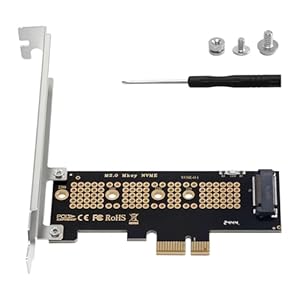
PCIe expansion card, Duttek PCIe NVMe Adapter, converts a motherboard PCIe x1 slot into an M.2 Key M slot for installing NVMe SSDs. Quiet, responsive storage upgrades make older systems feel noticeably snappier. Is reusing spare NVMe drives or adding a bootable SSD the simplest upgrade for your setup?
⚡ At a Glance
- • Interface Support: Converts PCIe x1 slot to an M.2 Key M slot, supporting PCIe NVMe 4.0/3.0 SSDs and sizes 2230/2242/2260/2280, not compatible with M.2 SATA
- • Best for: DIY upgraders and builders who need extra NVMe storage or wish to repurpose spare NVMe drives
- • Not ideal for: Users wanting to use M.2 SATA SSDs or those unwilling to take care during installation, as incorrect slot placement may cause damage
Converts a motherboard PCIe x1 slot into an M.2 Key M connector supporting NVMe 4.0/3.0 and multiple SSD lengths. Includes mounting hardware and supports booting on modern operating systems.
Add NVMe Storage to Older PCs, with PCIe x1 to M.2 Key M conversion
Conversion repurposes the motherboard's PCIe x1 lanes to carry the NVMe protocol, and the adapter accepts PCIe NVMe and AHCI drives in lengths 2230, 2242, 2260 and 2280. M.2 SATA protocols are not supported.
Allows installation of NVMe SSDs where no native M.2 slot exists, delivering faster boot and application load times without changing the motherboard.
Use NVMe Drives as Boot Media, with broad OS compatibility
Adapter supports booting from NVMe SSDs and is compatible with Windows 11, Windows 10, Windows 8, Linux and Mac OS; Windows 7 lacks a default NVMe driver and may fail to recognise the disk.
Permits use of an NVMe drive as the system disk on modern operating systems, but verify OS support before attempting older Windows installations.
Secure, tidy installation, with included mounting hardware
Package contents list includes the PCIe card, a screwdriver, a 120mm full-grade board, a stud and an HDD fixing screw to fasten 2230–2280 SSDs securely.
Supplies the small parts needed for a clean, vibration-free fit and a silent storage solution when drives are repurposed or added.
✨ The 4 Key Reasons for Duttek PCIe NVMe Adapter
- Quick installation, fits into a PCIe x1 slot for fast storage expansion
- Reuses spare NVMe drives, repurposes older SSDs for extra capacity and backups
- Bootable on modern OSes, lets NVMe act as a system drive on Windows 10/11, Linux, Mac OS
- Complete mounting kit, includes screwdriver and fixing screws for secure, neat installation
📋 Technical Details at a Glance
- Category: PCIe NVMe Adapter
- Brand: Duttek
- Product ID: B0F4KDM8PZ
- Interface: PCIe x1 to M.2 Key M
- Supported SSD types: PCIe NVMe and AHCI, not M.2 SATA
❓ Frequently Asked Questions
Q: Can I use an M.2 SATA SSD with this adapter?
A: No, M.2 SATA SSDs are not supported; the adapter is designed for PCIe NVMe and AHCI M.2 drives only.
Q: Will I be able to boot Windows from an NVMe drive installed via the adapter?
A: Booting is supported on modern systems and operating systems including Windows 11, Windows 10, Windows 8, Linux and Mac OS; Windows 7 may not recognise NVMe drives without additional drivers.
Q: Are there any important installation cautions?
A: Yes, the adapter must be installed in a PCIe x1 slot; installing in the wrong PCI slot can damage the adapter, the SSD and the motherboard.
🏆 Our Verdict
The Duttek PCIe NVMe Adapter suits DIY builders and anyone needing extra NVMe storage without swapping the motherboard. Converting a PCIe x1 slot into an M.2 Key M connector and including a full mounting kit makes reusing or adding NVMe drives straightforward and tidy. The straightforward fit and OS boot support deliver practical long-term value for upgrades and backups.
