





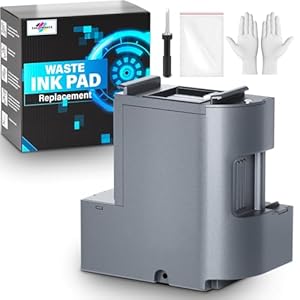
Printer maintenance solution that helps restore Epson printers by replacing saturated waste ink pads and supplying reset software for Windows. SUBLIMAKER Waste Ink Pad Replacement gives home and small-office users a practical route to clear E-11 errors and resume printing quickly. Is it the right choice if only a Mac is available?
⚡ At a Glance
- • Maintenance Reliability: Restores waste pad capacity tracking and reduces unexpected printer stoppages
- • Best for: Owners of Epson EcoTank ET-2700 to ET-2850 series needing pad replacement
- • Not ideal for: Users without a Windows computer to run the reset utility
Replacement waste ink pad supplied with installation tools and factory-tested quality. Designed to extend the working life of compatible EcoTank printers.
E-11 Error Recovery - with included reset software
Reset software runs on Windows and resets the printer's maintenance counter after the new waste ink pad is fitted. The combination of physical replacement and software reset returns the printer to normal error reporting.
Restores printer functionality and clears the 'Waste ink pad and maintenance box end of life' error so printing can continue.
Safe, Straightforward Replacement - thanks to the maintenance kit
Kit contents include a pre-formed waste ink pad, disposable gloves, a double-headed screwdriver and a sealed bag for used parts. Components are provided to reduce direct contact with ink and to make removal and disposal neater.
Hands-on replacement is easier and cleaner, reducing the risk of ink contact and simplifying disposal.
Broad ET-Series Compatibility - with support for multiple ET-2700 to ET-2850 models
Compatibility explicitly lists ET-2850, ET-2760, ET-2750 and ET-2700 and the seller can be contacted to check fit for other unlisted models. The replacement pad is aimed at common EcoTank layouts used across these models.
Suitable for many home and small-office EcoTank owners, with buyer support available if model confirmation is needed.
✨ The 4 Key Reasons for SUBLIMAKER Waste Ink Pad Replacement
- Included reset software - Clears the maintenance counter so the printer resumes normal operation
- Full maintenance kit - Supplied with gloves, screwdriver and sealed bag for tidy disposal
- Wide ET-series fit - Designed to fit multiple ET-2700 to ET-2850 models for broad compatibility
- ISO-9001 tested - Factory testing performed before dispatch to improve reliability
📋 Technical Details at a Glance
- Category: Printer maintenance replacement
- Compatible Printers: Epson EcoTank ET-2850, ET-2760, ET-2750, ET-2700 (and similar models)
- Included Software: Reset software (Windows only)
- Supported OS: Windows only, not compatible with Mac or other operating systems
- Box Contents: Waste Ink Pad x1, disposable gloves x1, double-headed screwdriver x1, sealed bag x1
❓ Frequently Asked Questions
Q: Will replacing the pad and using the software clear an E-11 error?
A: Replacing the waste ink pad and running the included reset software resolves the printer E-11 error labelled "Waste ink pad and maintenance box end of life".
Q: Is the reset software compatible with Mac computers?
A: The reset software is only compatible with Windows and does not support Mac or other operating systems.
Q: Which Epson printers are confirmed compatible?
A: Confirmed compatibility includes Epson EcoTank ET-2850, ET-2760, ET-2750 and ET-2700; contact the seller to check fit for other models.
🏆 Our Verdict
Best suited for home and small-office owners of compatible Epson EcoTank printers who need to clear maintenance errors and avoid replacing hardware. The combination of a replacement waste ink pad, a simple maintenance kit and included Windows reset software returns printers to service efficiently. For those with only Mac computers, factor in the software limitation when assessing long-term value.
