







4G routers remain a practical solution where fixed-line broadband is unavailable, unreliable, or needed as a failover. These devices let a cellular SIM provide the internet feed while sharing it over WiFi and Ethernet, making them ideal for rural homes, holiday cabins, pop-up offices, and backup connectivity for small businesses. Key buying factors include LTE category and achievable download/upload speeds, WiFi standard and band support, antenna design, the number and type of Ethernet ports, and useful extras such as VPN support or DNS encryption.
Ease of setup and carrier compatibility matter more than ever. Users should check whether a router is unlocked to any network, whether it uses a nano SIM, and how the maker exposes configuration controls via an app or web UI. For uninterrupted service look for WAN backup options and QoS controls, and for security pick devices that offer modern encryption, guest networks, and preferably DNS-over-HTTPS or dedicated VPN clients. The models below cover simple plug-and-play options, units with high-gain antennas and VPN features, and hub-style devices geared toward many connected clients.
1. TP-Link TL-MR105 4G LTE WiFi Router
Best Simple Plug-and-Play 4G Home Router
| SPECIFICATIONS | • Technology: 4G LTE (Cat4 inferred) • Peak Cellular Speed: Up to 150 Mbps download / 50 Mbps upload • WiFi Standard: 802.11n (N300) • WiFi Bands: 2.4 GHz (single-band) • Antennas: Internal antennas (compact housing) See more |
| TODAY'S BEST DEALS |  £39.99 £39.99 |
| REASONS TO BUY | +True plug-and-play SIM operation for fast setup +App-based management via TP-Link Tether simplifies administration +Supports up to 32 connected devices for small households +WAN connection backup adds flexibility when cellular or wired links are preferred +Proven brand reliability for basic home networking needs |
| REASONS TO AVOID | -Single-band 2.4 GHz WiFi limits peak throughput and may be crowded -Only two Ethernet ports restrict wired device connections -Internal antennas reduce range compared with models with high-gain external antennas |
Review
This compact router is built around simplicity. Insert a nano SIM, power the unit, and most users can be online in minutes thanks to the plug-and-play design and the TP-Link Tether app. The combination of LTE Category 4 cellular speeds and N300 WiFi makes it a good match for standard browsing, HD streaming on a couple of devices, and light home office use where ultra-low latency is not required.
Performance will reflect the limits of single-band 2.4 GHz WiFi. In congested environments that frequency can become noisy, which reduces effective throughput even when cellular backhaul is solid. For households that rely mostly on wireless connectivity, placement matters; positioning the router centrally will improve coverage and device experience.
The unit stands out for straightforward management and features aimed at families, such as guest network support and parental controls. It is not intended for heavy multitasking or many wired devices. Small homes or short-term deployments that need a reliable cellular internet feed will find the balance of ease and capability attractive.
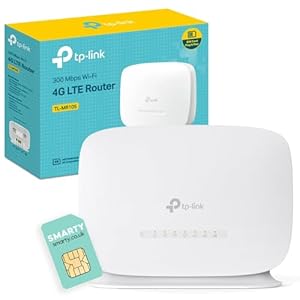
2. TP-Link TL-MR105 WiFi 4G Router with Free SIM Card
Best Value Option with Included SIM
| SPECIFICATIONS | • Technology: 4G LTE (Cat4 inferred) • Peak Cellular Speed: Up to 150 Mbps download / 50 Mbps upload • WiFi Standard: 802.11n (N300) • WiFi Bands: 2.4 GHz (single-band) • Antennas: External antenna ports (supports optional antennas) See more |
| TODAY'S BEST DEALS | £40.99 |
| REASONS TO BUY | +Includes a free starter SIM for immediate use +External antenna ports improve signal options in weaker reception areas +Plug-and-play setup with app support makes it travel-ready +Good for users needing a quick on-the-go hotspot with home router features |
| REASONS TO AVOID | -Single-band WiFi still limits performance for many simultaneous HD streams -Free SIM plans may have data limits or variable coverage -Basic feature set lacks advanced security or VPN clients |
Review
This configuration targets straightforward value. The inclusion of a starter SIM lowers the barrier for getting connected, making it a natural pick for temporary installations, vacation lets, or first-time buyers who need a working connection without carrier setup. The external antenna ports are an upgrade over strictly internal antenna designs, giving space to add a higher-gain antenna when reception is marginal.
Real-world performance follows the expectations of Cat4 LTE and N300 WiFi. Expect stable web browsing, video calls, and a few concurrent streams where cellular signal quality is good. The router remains sensitive to environmental congestion on the 2.4 GHz band, so environments with many neighboring networks will reduce its effective speed.
For users who need a low-friction entry into SIM-based internet this model is well suited. It is less appropriate for heavier networking needs that require dual-band WiFi, many Ethernet ports, or integrated VPN features for secure remote access.
3. TP-Link TL-MR6400 4G LTE WiFi Router
Best for Small Offices and Wired Devices
| SPECIFICATIONS | • Technology: 4G LTE (Cat4 inferred, unlocked) • Peak Cellular Speed: Up to 150 Mbps download / 50 Mbps upload • WiFi Standard: 802.11n (N300) • WiFi Bands: 2.4 GHz (single-band) • Antennas: 2 detachable external antennas See more |
| TODAY'S BEST DEALS | £60.11 |
| REASONS TO BUY | +Multiple Ethernet ports for wired devices and small office networks +Detachable antennas permit optimized placement and upgrades +Flexible LAN/WAN configuration and QoS priority for better traffic control +Unlocked unit compatible with many carriers, useful for travel |
| REASONS TO AVOID | -Single-band WiFi restricts wireless performance compared with dual-band alternatives -Older WiFi standard may not keep up with heavy concurrent streaming needs -No built-in advanced VPN client in basic firmware |
Review
This unit emphasizes wired connectivity and flexible deployment. The inclusion of four LAN ports makes it much more useful for small offices, workshops, and setups where desktop PCs, printers, or network storage need reliable wired links. Detachable antennas are a practical advantage in fringe reception areas; swapping in a higher-gain antenna or moving the antennas to improve line of sight produces measurable gains in speed and stability.
QoS controls and WAN backup give administrators the tools to prioritize critical traffic and fall back to wired broadband when available. The unlocked nature of the device also simplifies swapping SIMs for travel or moving between carriers in rural scenarios. The WiFi side remains single-band N300, so wireless users will not see the kind of multi-device throughput offered by newer dual-band models, but for a mixed wired/wireless environment this compromise is acceptable.
Value is found in the hardware flexibility rather than raw wireless speed. For any deployment that needs a small wired LAN plus cellular internet this model delivers sensible trade-offs and predictable performance under realistic loads.
4. Cudy N300 WiFi Unlocked
Best for Secure Remote Access and Long-Range Coverage
| SPECIFICATIONS | • Technology: 4G LTE (Cat4 inferred) • Peak Cellular Speed: Up to 150 Mbps download / 50 Mbps upload • WiFi Standard: 802.11n (N300) • WiFi Bands: 2.4 GHz (single-band) • Antennas: 4 x 5 dBi high-gain external antennas See more |
| TODAY'S BEST DEALS | £36.46 |
| REASONS TO BUY | +High-gain antennas extend reception and WiFi range +Built-in WireGuard/OpenVPN clients for site-to-site or remote access +DNS encryption options improve privacy and reduce DNS tampering +Unlocked BYOD SIM support and compatibility with many networks |
| REASONS TO AVOID | -User interface may be less polished than mainstream brands -Single-band WiFi limits concurrent wireless bandwidth -MTK chipset may lack some enterprise features found on higher-end routers |
Review
This router stands out for its emphasis on signal reach and network security. Four 5 dBi antennas materially improve reception in marginal cellular conditions and extend WiFi coverage around holiday cabins or workshop spaces. The MTK platform provides a reliable foundation for basic routing and wireless duties while keeping the unit affordable.
Where the unit really differentiates is in VPN and DNS features. Native support for WireGuard and OpenVPN lets all traffic be routed through a secure tunnel without the need for a separate device, which is a major benefit for remote camera feeds, monitoring equipment, or accessing a home network from a remote site. DNS-over-HTTPS or Cloudflare integration reduces the risk of DNS interception and simplifies privacy protections for all attached devices.
The trade-offs are the usual ones for this segment: single-band N300 WiFi is not suited to heavy multi-device streaming, and the web UI does not match the polish of larger vendor ecosystems. For users who prioritize secure remote access and extended cellular reception, however, these trade-offs are reasonable.
5. EE Unlocked Smart 4G
Best for Many Devices and Simple Setup
| SPECIFICATIONS | • Technology: 4G LTE (operator dependent) • Typical Download Speed: Average around 40 Mbps (network dependent) • WiFi Standard: Dual-band WiFi (2.4 GHz and 5 GHz inferred) • WiFi Coverage: Approximate 30-metre radius • SIM Slot: Nano SIM, unlocked for other networks See more |
| TODAY'S BEST DEALS | £23.79 |
| REASONS TO BUY | +Supports a large number of devices, useful for shared spaces +Dual-band WiFi provides balance of range and speed +Wide coverage area suitable for small offices or communal areas +Renewed units deliver value while remaining unlocked to networks |
| REASONS TO AVOID | -Renewed condition means potential variance in lifespan and warranty coverage -Average cellular speeds may be lower than Cat4 theoretical maximums -Fewer advanced enterprise features like built-in VPN or high-gain antennas |
Review
This hub-style device targets environments with many simultaneous clients, such as small offices, communal working spaces, or families with many smart devices. The combination of dual-band WiFi and a high advertised device capacity makes it suitable for scenarios where device count is a higher priority than raw per-device throughput. Setup is aimed at simplicity, allowing non-technical users to get connected quickly.
Performance will depend heavily on the mobile network in the location. The listed average download of around 40 Mbps is realistic on many networks and is sufficient for multiple HD streams and video conferencing when the cellular signal holds steady. Being a renewed unit reduces upfront cost but introduces variability in remaining lifespan and support, so confirm warranty terms before purchase.
For buyers prioritizing broad coverage and many concurrent clients over peak speed or advanced features, this hub is a practical pick. Professional installations or users needing long-term carrier-grade performance should weigh the pros and cons of a renewed consumer hub versus a new business-class router.
MORE: EE Unlocked Smart 4G Hub 2 HH10E WiFi Router White (Renewed) Review
Summary
Selecting the right 4G router depends on use case. For users who want the lowest friction setup and dependable home backup, the simple plug-and-play TP-Link options deliver straightforward operation and reliable basic feature sets. The model bundled with a starter SIM is particularly useful for quick deployments or short-term needs where carrier setup would otherwise slow things down.
If wired ports and flexibility for a small office are important, choose the unit with multiple LAN ports and detachable antennas to support wired workstations and better cellular reception. For secure remote access, the router with built-in WireGuard/OpenVPN and DNS encryption stands out, especially when protecting camera feeds or remote sensors is a priority. Finally, the hub-style renewed device is a sensible value choice for environments with many connected clients where ease of setup and broad coverage matter more than maximum throughput.

